Endoscopy Video Recorder – Features, Working Principle, Uses and Benefits
An Endoscopy Video Recorder is a digital recording device designed to capture and store video from compatible endoscopic imaging systems. Healthcare professionals use recording equipment to document selected examinations, procedures and training activities.
The recorder receives video signals from a compatible camera system and converts them into digital files. Consequently, clinicians can review captured footage when appropriate.
Furthermore, video documentation may support clinical records, professional education and quality improvement activities.
JDMeditech supplies endoscopy equipment, medical imaging accessories and surgical instruments for hospitals, clinics and medical distributors.
What Is an Endoscopy Video Recorder?
An endoscopic video recorder captures visual information generated by a compatible endoscopy camera system.
Typically, the equipment includes video input connections, electronic processing components, recording controls and compatible storage interfaces.
During operation, the recorder receives the video signal and stores the information using its supported recording format.
However, available recording functions depend on the selected equipment model.
How Does an Endoscopy Video Recorder Work?
A compatible endoscopy camera captures images from the connected optical instrument.
Next, the camera system generates a video signal.
The recorder receives that signal through a supported video input.
Subsequently, the recording electronics process and encode the video.
Finally, the equipment stores the resulting file on a compatible storage device.
Therefore, authorized personnel can access the recording according to the facility’s policies.
Working Principle of Digital Endoscopy Recording
Digital video recording combines signal input, electronic processing, video encoding and data storage.
First, the recorder receives an incoming video signal.
Next, the processing system converts the signal into a supported digital format.
The recording system then saves the video data.
Consequently, compatible playback equipment can display the stored recording.
However, image quality depends on the source signal, supported recording resolution and compression settings.
Key Features of an Endoscopy Video Recorder
- Digital Video Capture
- Compatible Endoscopy Camera Input
- Electronic Recording Controls
- Video Signal Processing
- Model-Specific Recording Resolution
- Supported Digital File Formats
- Compatible Storage Interfaces
- Potential Image Capture Functions
- Model-Specific Playback Features
- Compact Equipment Configuration
- Connection to Compatible Imaging Equipment
- Manufacturer-Defined Operating Functions
Furthermore, buyers should verify the exact functions and supported interfaces before purchasing.
Main Components of an Endoscopy Video Recorder
A typical digital endoscopy recording arrangement may include:
- Video Recording Unit
- Video Input Interfaces
- Electronic Processing Circuit
- Video Encoder
- Recording Control Panel
- Storage Interface
- Video Output Interface
- Power Supply
- Compatible Connection Cables
- Optional Storage Accessories
However, exact components and accessories vary between models.
1. Video Recording Unit
The recording unit houses the equipment’s electronic processing and recording components.
Furthermore, its design supports connection to compatible imaging equipment.
2. Video Input Interfaces
Video input ports receive signals from compatible camera systems.
However, supported connection types depend on the recorder model.
3. Electronic Processing Circuit
The processing circuit manages incoming video signals.
Additionally, it supports conversion and preparation of video data for recording.
4. Video Encoder
The video encoder converts incoming video into a supported digital recording format.
Consequently, the equipment can store the captured information as digital files.
5. Recording Control Panel
The control panel allows the operator to manage available recording functions.
Depending on the model, controls may include recording, stopping, playback or settings adjustments.
6. Storage Interface
The storage interface connects the recorder to supported storage media.
However, the device may use internal storage, removable media or another manufacturer-approved arrangement.
7. Video Output Interface
A compatible output connection may allow recorded or live video to appear on an external display.
Furthermore, supported output formats depend on the equipment configuration.
Clinical Applications of Endoscopy Video Recording
Healthcare facilities use compatible video recording systems for selected documentation and educational activities.
- Endoscopic Procedure Documentation
- Laparoscopic Procedure Recording
- Urological Endoscopy Documentation
- Hysteroscopic Procedure Recording
- Arthroscopic Procedure Recording
- ENT Endoscopy Documentation
- Medical Education
- Clinical Training
- Selected Quality Improvement Activities
- Authorized Case Review
However, recording activities must comply with patient consent requirements, privacy rules and institutional policies.
Endoscopy Video Recorder in Laparoscopy
Laparoscopic procedures use compatible imaging systems to display internal anatomical structures.
A video recorder may capture the camera output for authorized documentation.
Furthermore, recorded footage may support training and case review when permitted.
Endoscopy Video Recorder in Urology
Urological endoscopy includes selected diagnostic and therapeutic procedures.
Compatible video recording equipment can document the camera output during approved examinations.
Additionally, recorded material may support professional education and clinical documentation.
Endoscopy Video Recorder in Hysteroscopy
Hysteroscopy allows clinicians to visualize the uterine cavity through a suitable hysteroscope.
A compatible recorder may capture the imaging system’s video output.
Consequently, authorized personnel may review the recording when clinically appropriate.
Endoscopy Video Recorder for Medical Training
Video recording can support demonstration of selected endoscopic techniques.
Furthermore, authorized recordings may help trainees review visual findings and instrument handling.
However, facilities must protect patient information and obtain appropriate permissions.
Potential Benefits of Endoscopy Video Recording
- Digital Procedure Documentation
- Supports Authorized Case Review
- Useful for Medical Education
- Compatible Digital Storage
- Potential Image Capture Functions
- Supports Selected Quality Improvement Activities
- Convenient Playback on Compatible Equipment
- Model-Specific Recording Options
However, benefits depend on equipment compatibility, recording quality and appropriate use.
Endoscopy Video Recorder vs Endoscopy Camera System
| Feature | Video Recorder | Camera System |
|---|---|---|
| Primary Function | Records Video Signals | Captures Endoscopic Images |
| Image Sensor | Not Typically Required | Located in Camera Head |
| Video Recording | Primary Function | Model-Dependent |
| Optical Endoscope Connection | Usually Indirect | Through Compatible Camera Head |
| Video Storage | Supported Recording Function | Depends on Configuration |
| Clinical Integration | Compatible Video Source Required | Compatible Optical System Required |
Technical Specifications of Endoscopy Video Recorder
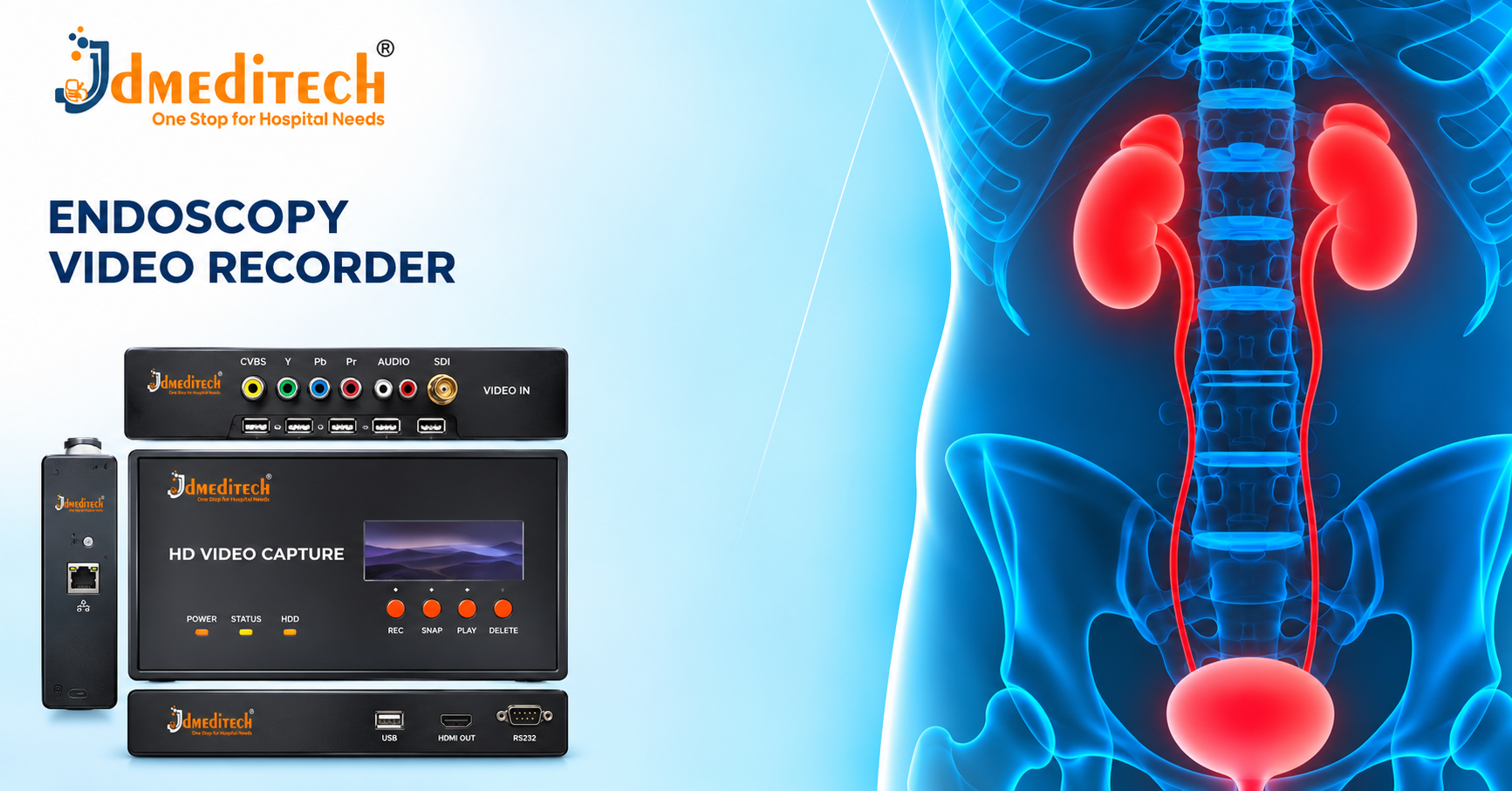
The supplied product image shows a digital video recording unit with front-panel controls and multiple connection interfaces.
However, the image does not confirm supported video resolution, recording formats, storage capacity or electrical specifications.
Therefore, buyers should verify the manufacturer’s official technical datasheet.
| Parameter | Product Information |
|---|---|
| Product Name | Endoscopy Video Recorder |
| Equipment Category | Medical Video Recording Equipment |
| Primary Function | Digital Video Recording |
| Equipment Configuration | Electronic Recording Unit |
| Video Input Interfaces | Confirm Manufacturer Specifications |
| Video Output Interfaces | Confirm Manufacturer Specifications |
| Maximum Recording Resolution | Confirm Manufacturer Specifications |
| Supported Frame Rate | Confirm Manufacturer Specifications |
| Video Encoding Format | Confirm Manufacturer Specifications |
| Recording File Format | Confirm Manufacturer Specifications |
| Storage Type | Confirm Manufacturer Specifications |
| Storage Capacity | Confirm Manufacturer Specifications |
| Image Capture | Confirm Available Configuration |
| Playback Functions | Confirm Available Configuration |
| Display Compatibility | Confirm Manufacturer Specifications |
| Camera Compatibility | Confirm Approved Equipment |
| Power Requirements | Confirm Manufacturer Specifications |
| Dimensions and Weight | Confirm Manufacturer Specifications |
| Regulatory Documentation | Verify for Destination Market |
Importance of Recording Resolution
Recording resolution describes the number of pixels stored in each video frame.
Higher recording resolution can preserve more visual detail when the source camera supports it.
However, the final recording quality also depends on compression, frame rate and source image quality.
Importance of Frame Rate
Frame rate describes how many video frames the recorder processes each second.
Furthermore, appropriate frame rate supports smooth playback of recorded movement.
However, supported frame rates vary between models.
Importance of Video Compression
Video compression reduces the amount of storage required for digital recordings.
However, some compression methods may reduce visible image detail.
Therefore, healthcare facilities should select suitable recording settings for their intended documentation needs.
Importance of Storage Capacity
Storage capacity determines how much recorded material the system can retain.
Furthermore, available recording time depends on resolution, frame rate, compression and storage size.
Consequently, buyers should evaluate storage requirements before selecting equipment.
Installation and Setup Considerations
Qualified personnel should install the recorder according to the manufacturer’s instructions.
First, they should verify video input compatibility.
Next, they should confirm the storage configuration and output connections.
Finally, they should test the recording and playback functions.
However, installation procedures vary by equipment model.
Safety Precautions for Endoscopy Video Recorders
- Follow Manufacturer Instructions
- Verify Electrical Safety
- Use Compatible Video Connections
- Inspect Power and Signal Cables
- Protect Equipment From Moisture
- Confirm Storage Readiness
- Follow Patient Privacy Requirements
- Use Authorized Recording Procedures
- Protect Stored Patient Information
- Perform Required Equipment Maintenance
Patient Privacy and Video Data Protection
Endoscopy recordings may contain identifiable patient information.
Therefore, healthcare facilities should establish appropriate consent, access and data protection procedures.
Furthermore, authorized personnel should store and share recordings according to applicable laws and institutional policies.
Additionally, facilities should implement suitable backup and retention procedures.
Inspection Before Equipment Use
- Confirm Equipment Identification
- Inspect the Recording Unit
- Check Video Input Connections
- Verify Output Connections
- Inspect Power Cables
- Confirm Storage Availability
- Test Recording Controls
- Verify Playback Functions
- Check Equipment Maintenance Status
- Follow Manufacturer Pre-Use Procedures
Cleaning and Maintenance Guidelines
Healthcare facilities should clean the external equipment surfaces according to the manufacturer’s instructions.
Furthermore, operators should protect electronic ports and connectors from moisture.
Additionally, technical personnel should inspect the recording system and verify its operating performance when required.
However, maintenance procedures depend on the specific equipment model.
Storage and Handling Recommendations
- Store Equipment in a Suitable Environment
- Protect Electronic Components From Moisture
- Avoid Mechanical Impact
- Maintain Adequate Ventilation
- Protect Connection Ports
- Handle Storage Media Carefully
- Follow Manufacturer Environmental Requirements
- Inspect Equipment Before Use
How to Choose the Right Endoscopy Video Recorder
Hospitals and procurement teams should evaluate several factors before purchasing recording equipment.
- Supported Video Input Formats
- Recording Resolution
- Frame Rate
- Video Compression
- Storage Capacity
- Storage Interface Compatibility
- Video Output Options
- Image Capture Functions
- Playback Capabilities
- Camera System Compatibility
- Data Security Requirements
- Electrical Safety Documentation
- Regulatory Documentation
- Technical Support Availability
Why Choose JDMeditech?
JDMeditech supplies endoscopy equipment, medical imaging accessories and surgical instruments for hospitals, clinics and medical distributors.
Furthermore, our team assists customers with product inquiries, available configurations and quotation requests.
Customers can contact JDMeditech regarding:
- Endoscopy Video Recorders
- Full HD Endoscopy Camera Systems
- USB Endoscopy Camera Systems
- Endoscopic Imaging Accessories
- Laparoscopy Equipment
- Urology Endoscopy Equipment
- Hospital Imaging Equipment
Frequently Asked Questions
1. What Is an Endoscopy Video Recorder?
It is an electronic device that captures and stores video from compatible endoscopic imaging systems.
2. What Is an Endoscopy Video Recorder Used For?
Healthcare professionals use it for authorized procedure documentation, case review and medical education.
3. Does the Recorder Include a Camera?
Not necessarily. Most recording systems receive video from a separate camera or imaging source.
4. Can It Record Laparoscopy Procedures?
Yes, when connected to compatible imaging equipment and used according to approved procedures.
5. Can It Record Urology Endoscopy?
Selected recorders support compatible urological imaging systems.
6. Does Every Recorder Support Full HD?
No. Supported recording resolution varies between models.
7. Can It Capture Still Images?
Selected models provide image capture functions.
8. What Storage Devices Can It Use?
Supported storage media depend on the recorder’s specifications.
9. Does Recording Affect Video Quality?
Recording resolution, compression and source signal quality can influence the saved video.
10. Is Patient Consent Important?
Yes. Recording must follow applicable consent, privacy and institutional requirements.
11. Does the Equipment Require Maintenance?
Yes. Healthcare facilities should follow manufacturer instructions for inspection and maintenance.
12. Where Can Customers Request Product Information?
Hospitals, clinics and medical distributors can contact JDMeditech for product details and quotations.
Conclusion
In conclusion, the Endoscopy Video Recorder supports digital recording of video from compatible endoscopic imaging equipment.
Furthermore, recorded footage may support clinical documentation, education and authorized case review.
However, recording performance depends on the source camera, video connections, encoding functions and storage configuration.
Therefore, healthcare facilities should verify technical specifications and equipment compatibility before purchasing.
JDMeditech – One Stop for Hospital Needs
Website:
www.jdmeditech.com
Related Endoscopy Equipment
- Full HD Endoscopy Camera Systems
- USB Endoscopy Camera Systems
- Endoscopic Camera Heads
- Endoscopic Light Sources
- Laparoscopes
- Endoscopic Imaging Accessories
Medical Equipment Reference
For general information about medical device safety and regulation, visit the
World Health Organization – Medical Devices
.
Medical Disclaimer
This article provides general educational and product information only. It does not replace professional medical advice, clinical judgment, specialist training or manufacturer instructions. Healthcare professionals must verify approved indications, recording specifications, camera compatibility, electrical safety, patient data protection requirements and regulatory documentation before clinical use.